Mindmapping in Flowstate
Map a website relaunch with ideas, decisions and reference material on one Board. Open a Frame when one branch needs more space.
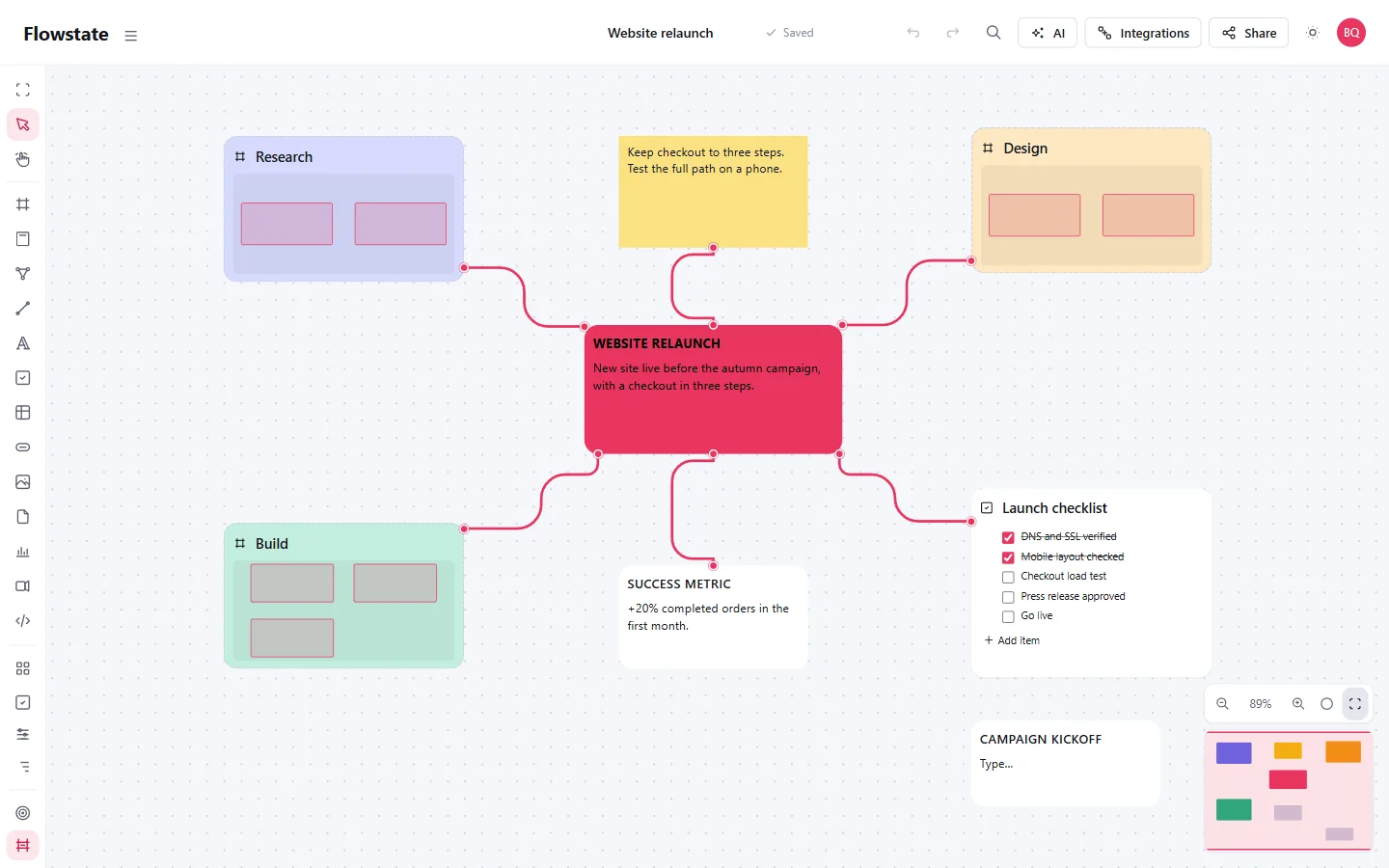
Example: plan a website relaunch
- Add Text called Website relaunch. Write the goal: make the checkout easier to use.
- Add three Frames: Research, Design and Build. Connect each to the goal.
- Open Research. Add interview notes, reference links and the questions you need to answer.
- Open Design. Keep page ideas and decisions together. Add images or files when they help explain the work.
- Return to the overview and add a Launch checklist beside the map.
You now have an overview that opens into working material. The notes remain inside the same Project.
Keep the map readable
Use Connections for relationships and Frames for detail. Use Auto layout on the whole Board or a selection. For manual placement, snapping can match edges, centers and nearby spacing.
A connection describes a relationship. It does not automatically create a dependency, change a date or run an action.
Turn an idea into work
Add planning fields in Properties, or put checkable actions in a Task List. Tasks collects work across the Project; Timeline shows items with dates.
Invite someone with Can view to read the map or Can edit to work on it. Both can navigate into the Frames they are allowed to see.
Try it
Create a Project, then add the goal and three Frames above. No AI setup is needed.
Next: plan the work and dates, read the Board guide, or find an answer.